Meta Ads Attribution: 7-Day Click vs 1-Day View Explained
Meta Ads Attribution: 7-Day Click vs 1-Day View Explained
If your Meta Ads Manager is showing over 30x ROAS, would you scale the campaign?
Most advertisers would probably say yes.
But as always in marketing, the answer is actually it depends.
I recently reviewed a campaign where the reported ROAS was over 30x. At first, the results looked amazing.
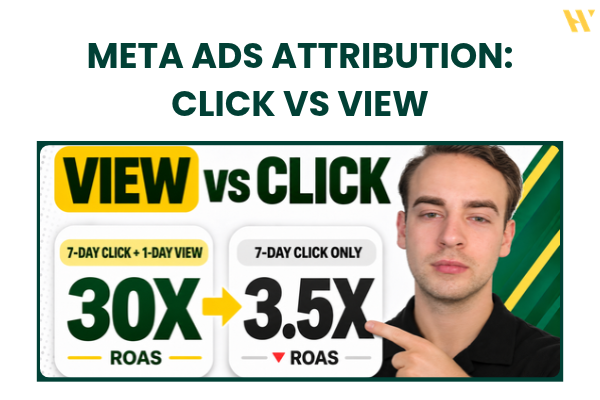
But when I compared the attribution settings and looked at 7-day click attribution only, the ROAS was just 3.5x.
That's a huge difference.
And if you're making scaling decisions based on the higher number without understanding where those conversions are coming from, you could end up spending more money on a campaign that isn't meeting your actual targets.
This is why I think more advertisers need to understand Meta Ads attribution settings.
In this guide, I'll explain what attribution means, how 7-day click and 1-day view attribution work, and how you can compare different attribution windows inside Meta Ads Manager.
I'll also show why this becomes especially important when you're advertising on multiple platforms, including Google Ads, Meta Ads, and TikTok, while also running email marketing campaigns.
If you'd rather watch the full walkthrough using a real ad account, here's the video:
Watch: Meta Ads Attribution Settings Explained
What Are Meta Ads Attribution Settings?
Let's start with the basics.
Attribution determines when Meta credits a conversion to your ads.
For example, somebody sees your Facebook ad, visits your website, and makes a purchase.
That's a fairly simple customer journey.
But what if they don't purchase immediately?
What if they click your ad, leave the website, and come back three days later?
Or what if they see your Instagram ad, don't click it, but later find your brand through Google and make a purchase?
These situations can be measured differently depending on the attribution window.
And that can make a huge difference in your reporting.
Two of the most important settings I explain in the video are:
7-day click attribution
1-day view attribution
They're often used together, but they measure different types of interactions.
Understanding that difference is important before evaluating your ROAS, CPA, or campaign profitability.
How 7-Day Click Attribution Works
Let's start with 7-day click attribution.
This means that someone clicks your ad and completes a conversion within seven days.
For example:
On Monday, someone clicks your Facebook ad and visits your website.
They look at your products, but they don't purchase.
Then on Thursday, they come back and buy something.
Because the purchase happened within seven days of the qualifying ad click, Meta can attribute that conversion to your ad.
Pretty simple.
The customer doesn't need to purchase immediately after clicking.
There's a window where the purchase can still be credited to the advertising interaction.
That's useful, especially for products where customers need some time to make a decision.
And for ecommerce campaigns, I like reviewing click-attributed performance because it gives me a clearer view of conversions associated with people who actually clicked through from the ads.
But there's another attribution window that can make the numbers look very different.
How 1-Day View Attribution Works
Now let's talk about 1-day view attribution.
This is where many advertisers get confused.
With 1-day view attribution, someone doesn't need to click your ad for Meta to potentially credit a conversion.
They just need to see the ad and complete a qualifying conversion within the attribution window.
Let's use an example.
Someone is scrolling through Instagram and sees your ad.
They don't click it.
They don't visit your website directly from that ad.
Later that day, they search for your business on Google.
They click a search result and purchase a product.
Under 1-day view attribution, Meta may still credit the purchase to your ad because the person saw the advertisement before converting.
And this is where things become more complicated.
The customer might have also interacted with your Google Ads, organic search, or email marketing.
Different platforms can claim credit for the same order under their own attribution systems.
Now, that doesn't mean the Instagram impression had no influence.
Maybe the person remembered your brand because they saw the ad.
But seeing an ad before purchasing isn't the same as proving that the ad caused the purchase.
That's the important distinction.
Why View Attribution Can Make ROAS Look Higher
When you combine 7-day click and 1-day view attribution, your reported results may include conversions credited through either type of interaction.
That means your reported purchase value and ROAS can be significantly higher than when you look at click-attributed results alone.
And that's exactly what happened in the campaign I show in the video.
The combined attribution window produced an excellent-looking ROAS.
But when I separated the attribution windows, the picture changed.
For advertisers who are also running Google Ads, TikTok Ads, and email campaigns, this is particularly important.
The customer journey rarely happens on one platform.
Someone might discover your brand on Instagram, research it on Google, read an email, and finally purchase.
You need to understand how those interactions are represented in each platform's reporting.
Otherwise, you could end up treating attributed revenue from several platforms as though each platform independently generated all those sales.
Real Campaign Example: Over 30x ROAS vs 3.5x ROAS
Now let's look at the example from my video.
I opened one of my Meta Ads campaigns and compared the performance using different attribution windows.
The difference was huge.
Here's what I found.
Attribution view | Reported ROAS |
|---|---|
7-day click + 1-day view | Over 30x |
7-day click only | 3.5x |
Under the combined window, the campaign appeared to be generating extremely strong results.
If you only looked at that number, you might think the next step was obvious.
Increase the budget.
Scale the campaign.
Try to get more purchases.
But when I looked at 7-day click attribution only, the report showed approximately 150 website purchases and 3.5x ROAS.
That's a completely different picture.
And the difference was primarily associated with view-through attribution in the example.
To be clear, the 3.5x figure isn't automatically the campaign's one true return, and the conversions credited through views aren't automatically worthless.
But the comparison tells me that a large portion of the reported performance depends on which attribution window I'm using.
That's something I absolutely want to know before increasing my advertising budget.
Would I Scale This Campaign?
Let's say my scaling target is 4x ROAS when evaluating click-attributed performance.
Under the combined window, the campaign shows over 30x.
Looks great.
But under the 7-day click-only window, it's at 3.5x.
That means the campaign isn't meeting the click-based target I'm using for this decision.
In that situation, I would hold the budget rather than scale immediately.
I would review the reporting, compare the performance with other data sources, and understand how profitable the campaign really is.
A target of 4x is only an example here.
Every business needs its own targets based on margins, acquisition costs, and the wider business model.
The important thing is to compare performance against the target using a consistent measurement method.
How to Compare Attribution Settings in Meta Ads Manager
Now let's get into the practical setup.
You don't need to guess how many of your conversions come from different attribution windows.
Meta Ads Manager has reporting options that allow you to compare them.
I walk through this process in the video using a real advertising account.
Step 1: Open Meta Ads Manager
Start by opening your Ads Manager.
Find the campaign you want to analyze.
For this example, I selected a campaign with enough purchase data to make the comparison useful.
If you're doing this in your own account, select a campaign where the reporting differences are worth investigating.
You can also repeat the process across multiple campaigns.
Step 2: Choose the Correct Date Range
Before analyzing the numbers, make sure you're using the correct reporting period.
In my walkthrough, I used the maximum available timeframe for the campaign.
You don't necessarily need to do that.
You could review the last 30 days, last 90 days, or another relevant period.
The important thing is to use the same timeframe when comparing attribution settings.
Otherwise, you might accidentally compare results from different reporting periods.
And that wouldn't tell you much about the attribution difference.
Step 3: Open the Breakdown Menu
Next, find the Breakdown menu in Ads Manager.
In the video, I demonstrate the Attribution Settings breakdown.
This allows you to examine how attributed results are distributed across the available settings.
Depending on the account and reporting interface, you'll see different attribution categories.
Step 4: Use Compare Attribution Settings
You can also access the comparison through the Columns menu.
Look for Compare Attribution Settings.
This is the feature I focus on in the tutorial.
It allows you to compare reported results across selected attribution windows.
For example, you can review:
1-day click
7-day click
1-day view
The exact options available can depend on Meta's current reporting interface and campaign setup.
For the example in the video, I focus primarily on 7-day click and 1-day view.
Step 5: Compare Purchases and ROAS
Once you've selected the attribution windows, review the performance metrics.
I would pay particular attention to:
Website purchases
How many purchases are being credited under the different windows?
Purchase conversion value
How much purchase value is attributed to the campaign?
Purchase ROAS
How much attributed revenue is being reported relative to advertising spend?
Ad spend
Keep the spend figure in view so you understand the denominator behind the ROAS calculation.
The goal is to see how much the reported performance changes when you include or exclude different types of attribution.
This can help you spot campaigns where a large share of the reported results comes from views rather than clicks.
Step 6: Review the Difference Before Scaling
Finally, compare the figures with the targets you actually use to manage the account.
If your campaign looks excellent under the combined window but is below your target under click-only attribution, that deserves further investigation.
You might decide to hold the budget.
You might check the performance in another analytics tool.
Or you might look more closely at the rest of the funnel.
But I wouldn't blindly scale based on the highest ROAS number available.
One important detail: comparing attribution settings in reporting is different from changing an ad set's attribution setting. The latter can also influence how Meta optimizes delivery, so I wouldn't change it without understanding the consequences.
Why Attribution Matters Even More With Multiple Marketing Channels
Let's say you're running an ecommerce brand.
You have several marketing channels running at the same time:
Facebook Ads.
Instagram Ads.
Google Ads.
TikTok Ads.
Email marketing.
Maybe you're also generating organic traffic through SEO.
A customer might interact with multiple channels before making a purchase.
This is normal.
But each advertising platform has its own method for assigning conversion credit.
For example, Meta could report a view-through purchase because someone saw an Instagram ad.
Google Ads might also report a conversion connected to a search ad click.
And your email marketing platform might show that the customer clicked an email before purchasing.
If you simply add up all the reported revenue across these platforms, you risk double-counting the same sales.
That's why I think attribution becomes more important as your marketing setup gets more complicated.
You need to understand what the numbers actually mean.
Does This Mean You Should Always Turn Off View Attribution?
Not necessarily.
Personally, I like using click-only attribution as an important comparison when evaluating ecommerce campaigns, especially when several channels are involved.
But view-through conversions can still provide useful information.
Some advertising works by influencing people before they're ready to click.
A customer might see your creative several times before remembering your brand and searching for it later.
So I wouldn't automatically ignore every view-attributed conversion.
The goal is to understand the difference and avoid confusing reported attribution with incremental business impact.
When Should You Use 1-Day Click vs 7-Day Click?
Another question is which click window you should review.
The answer depends on your business and the customer journey.
1-Day Click
A 1-day click window focuses on conversions happening within one day of a qualifying ad click.
This can be useful for looking at more immediate conversion behavior.
For example, if you're running a straightforward offer with a short buying process, it's useful to know how many people convert quickly.
But it may miss purchases that happen several days after the click.
7-Day Click
A 7-day click window gives customers more time to convert after clicking an advertisement.
For many ecommerce campaigns, this is a useful reporting window to review.
It captures purchases that may not happen immediately.
In my video, the main comparison is between the 7-day click-only results and the combined 7-day click plus 1-day view results.
The key is consistency.
I wouldn't compare one campaign using 1-day click ROAS against another campaign using a different attribution window without accounting for that difference.
What About Engaged-View and Engage-Through Attribution?
In the Ads Manager walkthrough, I also mention engaged-view attribution.
This is another attribution category you might see in your reporting.
Meta's attribution system has changed over time, including updates to how different interactions are classified.
Rather than treating every interaction as a standard ad click, Meta can distinguish link-driven conversions, view-through conversions, and other engagement-related interactions.
That makes it important to understand which categories are included in the report you're reviewing.
I've covered those broader changes in my separate article:
Meta Ads Attribution Overhaul 2026: New Click Rules and Reporting Changes
That guide is a useful follow-up if you want to understand how the platform's attribution system has evolved.
Should You Use a Third-Party Attribution Tool?
If you're advertising across multiple platforms and spending a significant budget, additional attribution tools can be worth considering.
In the video, I mention Triple Whale.
It's one of the tools I like using for ecommerce attribution analysis.
I'm not affiliated with it.
The benefit is that you can compare data from different marketing channels rather than relying only on the numbers inside each individual ad platform.
But there's something important to understand.
A third-party attribution tool doesn't automatically give you perfect data.
Different tools use different attribution methods.
Tracking can still be incomplete.
Privacy restrictions, customer journeys across devices, and data availability can affect the results.
So the goal isn't to find a magical tool that tells you the one correct number.
It's to get a better understanding of your advertising performance by comparing multiple sources.
Using AI for Attribution Analysis
You can also use AI tools like ChatGPT or Claude, along with supported data connections, to help analyze attribution reports.
For example, you could compare:
Purchase results by attribution window
Differences between click and view attribution
Campaigns with unusually high view-attributed conversion shares
ROAS relative to your target
Performance changes over time
But AI still needs access to the right data.
And you still need to understand your margins and business goals.
If you want to explore this workflow, check out my AI Meta Ads Analysis guide.
How Attribution Affects Meta Ads Scaling Decisions
This is probably the biggest takeaway from the video.
Attribution isn't just a reporting setting.
It can affect the decisions you're making with real advertising budgets.
Imagine that you're managing ads for a client.
You look at their Meta Ads Manager and see over 30x ROAS.
You tell them the campaign is doing extremely well.
Then you recommend increasing the advertising budget.
But after checking the attribution breakdown, you realize the campaign is reporting only 3.5x ROAS from 7-day click attribution.
Now the scaling decision might be completely different.
Especially if your target is 4x under that measurement method.
This is why I always recommend understanding the reporting before deciding what to scale.
And it's not only about attribution.
You also need a campaign structure that makes it easy to test and identify winning ads.
I cover that process in my Meta Ads campaign structure guide for 2026.
Having a clean campaign structure and reliable reporting makes your next decisions much easier.
My Checklist Before Increasing Meta Ads Spend
Before increasing a campaign's budget, here's what I normally want to understand.
1. Is the reported ROAS based heavily on view attribution?
If so, I want to compare it with click-only reporting.
2. Am I using a consistent attribution window?
I don't want to compare results measured under completely different settings.
3. Does the campaign meet the actual business target?
That includes break-even ROAS, acquisition costs, and profitability.
4. Are other marketing channels contributing to the same purchases?
If Google Ads, TikTok, and email are running, I want to consider the overlap.
5. Is the tracking reliable?
There's no point optimizing based on numbers that aren't being collected properly.
6. Does the campaign have enough conversion data?
A few purchases aren't enough to make every scaling decision confidently.
7. Have I checked the reporting breakdown before scaling?
This is the practical step I demonstrate in the video.
Once I understand these things, I have a much better foundation for deciding whether to increase, maintain, or reduce spend.
Frequently Asked Questions About Meta Ads Attribution
What is the difference between 7-day click and 1-day view attribution?
7-day click attribution credits qualifying conversions within seven days of an ad click.
1-day view attribution can credit qualifying conversions within one day of someone seeing an ad, even without clicking.
They measure different types of advertising interactions.
Can 1-day view attribution make my ROAS look higher?
Yes.
Including view-attributed purchases can increase reported purchase value and ROAS compared with a click-only reporting window.
That doesn't automatically mean those conversions are fake, but it's important to understand how they're being credited.
How do I compare attribution settings in Meta Ads Manager?
Open Ads Manager, select the relevant campaign and timeframe, then find Compare Attribution Settings in the Columns menu.
You can also review the Attribution Settings breakdown where available.
The video shows this process step by step.
Is 7-day click-only ROAS the real ROAS?
Not necessarily.
It's a more restrictive attribution view, but it doesn't prove how much incremental revenue your advertising created.
To evaluate profitability, you should also consider business costs, other marketing channels, and your wider measurement setup.
Should I scale a campaign showing 30x ROAS?
Not based on that number alone.
First, check the attribution settings, compare the results with your target, and make sure the campaign is actually generating profitable business outcomes.
Final Thoughts: Check Your Attribution Before Scaling
Meta Ads reporting can make a campaign look extremely profitable.
But before increasing your advertising spend, you need to understand where those numbers are coming from.
In my example, the combined attribution window showed over 30x ROAS.
When I looked at 7-day click attribution only, the result was 3.5x.
That's a huge difference.
And if you're running several marketing channels, it's especially important to understand which conversions are being credited to Meta.
My recommendation is simple.
Before scaling, compare your attribution settings.
Check the click-only results.
Understand the contribution of view attribution.
Review your actual profitability targets.
And make sure your tracking is working properly.
You don't need to make this more complicated than necessary.
But you do need to understand the numbers you're using to make advertising decisions.
If you want to see the complete walkthrough inside Meta Ads Manager, watch my video here:
Watch: Meta Ads Attribution Settings Explained
Want More Practical Meta Ads Strategies?
Inside Meta Ads Systems by Wupscale, I share practical tutorials covering tracking, campaign optimization, creative testing, reporting, and scaling.
The goal is to help you understand what's happening inside your ad account and make better decisions based on the data.
If you want to go deeper, join the community here:
https://www.skool.com/advertising
And if you haven't watched the attribution tutorial yet, start with the video above.
I'll see you inside!
Máté