Meta Custom Audiences and Lookalikes Explained (Full 2026 Setup Guide)
Meta Custom Audiences and Lookalikes Explained (Full 2026 Setup Guide)
Before you can run a good retargeting or scaling campaign, you need to understand your audiences. So in this guide I am going to break down the two main types of audiences you can set up inside Meta, show you how to build each one step by step, and explain when to actually use them.
The two types are custom audiences and lookalike audiences. We use these mainly for audience testing, retargeting, and sometimes scaling. If you would rather watch me build them on a real account, the video is here: How To Set Up Meta Ads Audiences
The two types, in plain English
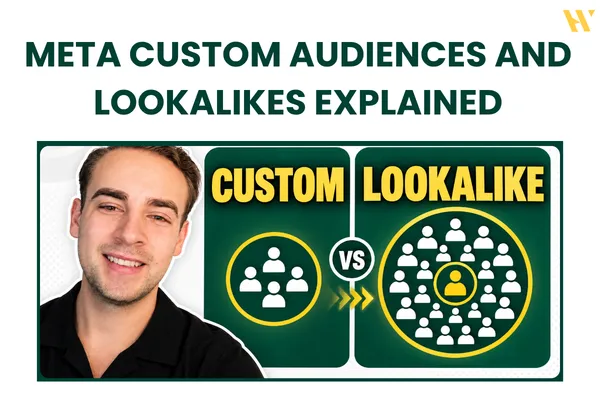
A custom audience is your existing audience, the people who are already familiar with your business. This can be website visitors, people who engaged with your social media, an email list, a customer list, or people who took a certain action on your website like a purchase or an initiated checkout. These are the people we use mainly for retargeting.
A lookalike audience is people similar to them. Meta takes one of your custom audiences and goes out to find new people who are likely to resemble the ones who already engaged with you. For example, you can build a lookalike based on people who watched your Instagram videos, then run ads to new people likely to be similar.
Here is my honest take for 2026: I do not really use lookalikes as much as I used to. They were a really strong strategy, but things have changed with how broad targeting performs now. I still want to mention them because plenty of marketing agencies still use them. A common play is to take a customer list, build a lookalike from it, and run ads to that cold, larger audience in one specific country. So it is worth knowing how they work even if you lean on them less. Getting your audience foundation right is one of the first things we cover inside Meta Ads Systems.
Building a custom audience, step by step
Head into Ads Manager, go to audiences on the left side, and make sure you are in the correct ad account before you start. Click create an audience, and you will see you can create a custom or a lookalike audience.
Start with a custom audience. You will see different sources: sources that you control, and sources that Meta controls (like Instagram and Facebook engagement).
Let me use the Instagram profile as an example. Select the Instagram profile you want to use, then choose your events. I recommend using people who engaged with this professional account, because that captures everything: follows, likes, comments, story views, and video views. But you can get more specific if you want, like only people who saved a post or sent you a message.
Then set your audience retention window. This depends on your audience size. If you reach millions of people every month, you can just use 30 days, because you are constantly reaching new people. My audience is not huge, especially on Instagram, so I usually use 90 or 180 days. And always name your audience so the window is clear, something like "Instagram 90 day." This clean labeling is the same discipline behind our whole creative testing approach: if you cannot read it at a glance, you cannot use it well.
More custom audience sources
You are not limited to social engagement. A couple of other sources worth knowing:
Video views. You can select all video viewers, choose the Facebook page or Instagram account, and even pick a specific video to retarget. So if one video got 1,500 views, you can retarget exactly those people.
Website visitors. This one needs your pixel. Select the pixel, then choose your events: all website visitors, or something more specific like people who purchased. For my Skool community, I select the pixel and target all website visitors, everyone who visited, on a 180-day window, and name it something like "Skool visitor 180 days."
When you create a new audience, the size will show as pending because it takes some time to collect the data, but it is already available to use in your campaigns right away.
Building a lookalike audience
Here is the key thing about lookalikes: you always need a source audience to create one. It is based on something.
For my example, I use my Skool members from the last three months as the source. Select that audience, click the three dots, and choose create a lookalike.
Now you select the location, and this is important: a lookalike is for one country at a time. Recently I have had good success in Australia, so I might build one there. You can technically add more countries like Canada, but your data will not be as clean if you lump them together. So my suggestion is to create one lookalike per country (or one broad one), rather than mixing several countries into a single audience.
Then you set the audience size with the percentage slider. This is the part people get wrong. 1% is the smallest audience and the most similar to your source. As you move the slider up, the audience gets bigger but less similar to your original people. So the smaller the percentage, the closer the match. I create a 1% audience.
Once created, you will see your lookalikes organized under a dropdown in the audiences section, so I might have one for the US and one for Australia sitting there ready to use.
How to use them in a campaign
Setting these up in a campaign is simple. Go to Ads Manager, or from the audiences section select an audience, click the three dots, and create a new campaign from it. In the next step of this series, I use these custom audiences to build a full retargeting campaign, so getting your audiences right first is what makes that work.
When to use which
Here is the simple way to think about it. Custom audiences are warm, the people who already know you, so they are perfect for retargeting, your highest-intent, cheapest conversions. Lookalikes are cold, new people who resemble your best customers, used for prospecting at scale, mostly by agencies working off a strong source list. And in 2026, with broad targeting performing so well, I lean far more on custom audiences for retargeting than on lookalikes for cold. Your mileage may vary, but that is where the results have been for me.
Want the full system?
Audiences are the foundation. Inside Meta Ads Systems, my Skool community, I teach the complete campaign structure they fit into: audiences, testing, retargeting, and scaling, with real campaign reviews where I set up member accounts exactly like this. It comes with real member results.
Join Meta Ads Systems on Skool and build on a proper foundation.
And if you want to watch me create each of these audiences on a real account, the video is here: How To Set Up Meta Ads Audiences