How To Turn Off Meta Creative Enhancements (And Why You Should in 2026)
How To Turn Off Meta Creative Enhancements (And Why You Should in 2026)
If you run Meta ads, you already know about creative enhancements. And you probably already know they are annoying. In this article I am going to explain why they are a real problem, how to turn them off, and the best practices so Meta stops messing with your ads.
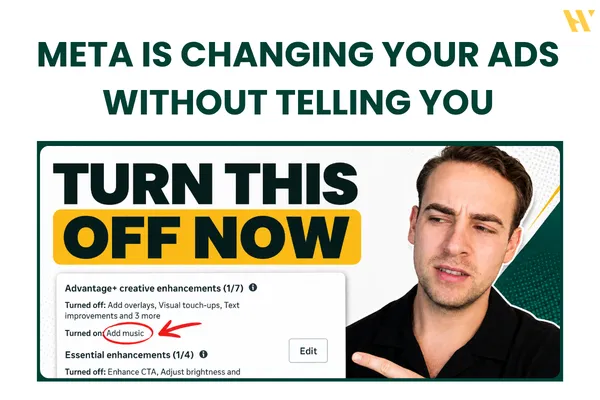
The core issue is simple: Meta is changing your ads without telling you. You can turn off the text overlays, the image expansion, the AI image variations, and the music, but any time you edit or duplicate an ad, Meta often turns them back on. So you have to double-check every single change.
If you would rather watch me walk through all of it on a real account, the video is here: Meta Is Changing Your Ads Without Telling You
Why creative enhancements are a real problem
This is not just a cosmetic annoyance. The AI enhancements and text improvements can completely change your ad. They change your messaging, they change your data, and they mess up your testing. Meta can also change your call to action, suggest you triple your ad spend, or push you toward completely different placements, audiences, and budget setups.
And it can get you into actual trouble. Getting the fundamentals right, clean tracking, clean structure, clean creative, is what we focus on inside Meta Ads Systems, because none of your decisions are reliable if Meta is silently altering the inputs.
The client story that shows the danger
Here is a real example. I had a client with the word "free" in the primary text of an ad. We accidentally left the text improvements turned on, and Meta changed the headline to "get a free consultation today." The problem: we were never offering a free consultation.
We started getting calls asking about the free consultation, and at first we had no idea where it was coming from, because we never wrote that anywhere at the ad level. Meta had completely rewritten our messaging on its own.
Now imagine that in a compliance-heavy industry. If Meta changes your ad and your messaging, you can end up with ad rejections, or worse, lawsuits, all because the platform altered something you never approved.
How creative enhancements ruin your test data
If you have watched my other videos, you know I am all about structured testing: clean data so you can make a clear decision for the next round of tests. Meta enhancements completely screw this up, and this is the part that costs you the most without you even noticing.
Here is a real account. We were running a creative test, using copy one across four different ads. At a glance, ad number one was the clear winner. It had the most purchases, a decent cost per purchase, and it pulled most of the spend. So naturally, in the next round we would just scale that ad.
But something was off. Once we duplicated the winning ad, I did not actually see the original video. I saw different images and different videos. So I went to the breakdown, selected image, video, and slideshow as the breakdown, and there it was: that single "ad" was actually three different creatives Meta had added through related media. And when you split them out, a different creative had the better conversion rate, more results, and a better cost per result.
So the ad I thought won was not the ad that actually won. That is how badly related media corrupts a creative test, and most people never check the breakdown, so they scale the wrong thing. This is exactly why the structured creative testing approach matters, one variable, clean data, no surprises.
How to turn creative enhancements off (step by step)
Here is what to do on an existing ad, and where Meta hides each setting.
When you duplicate an ad, Meta often turns multi-advertiser ads back on. Turn it off unless you run an ecommerce brand. Then at the creative setup, it turns on summaries and promotions, so go into edit and turn those off. For website highlights, click the pencil icon and choose not to apply them.
Related media is the big one, because if you are running a creative test you only want one image and one video per ad, but Meta suggests adding five more images and two more videos to the same ad. Turn it off. Then check the call to action, because Meta may have quietly changed it (mine went from "learn more" to "see details"). Inside advantage creative, you will often find it has added overlays, music, city enhancement, brightness changes, and video effects. Turn all of those off. Relevant comments are fine to leave on.
Setting up a clean ad from scratch
When you build a new ad, walk through every step deliberately. Skip the AI text options, especially the AI text generation. Skip the AI image generation, since it produces something completely different from what you designed. Turn off the music, and turn off translations.
A couple of Skool-specific warnings. If you turn on site links for a Skool community, Meta pulls listings from Skool.com and can literally advertise your competitors, since they are on Skool too. And cropping is now more awkward: to adjust sizes, go to where it says "one of ten media selected" and crop each placement. This is exactly why I design my ads at 9:16, so the vertical fits and I only need to adjust the square and horizontal crops.
One more thing to watch: even after you turn brightness off, it sometimes comes back on the next screen. So re-check everything right before you publish.
Ignore what Meta tells you
Meta will constantly tell you your campaign "needs to improve," that you should raise your opportunity score, or that your setup is not optimized. Ignore it.
Those features are not working, and turning them on messes up your data. You spent time designing your ad and editing your video for a reason. You do not want Meta adding video effects, rewriting your headline, or swapping your creative. Design it the way you want it, keep it that way, and re-check after every edit and duplicate.
Honestly, the user interface and experience of the Meta ads platform is pretty bad right now, and hiding these toggles where beginners cannot find them is a big part of the problem.
Want clean, reliable test data?
If you want structured testing and campaign systems that actually give you data you can trust, that is exactly what we build inside Meta Ads Systems, my Skool community. The full classroom covers clean creative testing, campaign structure, tracking, and scaling, with real campaign reviews and member results.
Join Meta Ads Systems on Skool and stop letting Meta make your decisions for you.
And if you want to watch me turn every one of these settings off on a real account, the video is here: Meta Is Changing Your Ads Without Telling You